Marcus had been running a successful consulting firm for six years. His website was clean, well-designed, and loaded with case studies and thought leadership articles that his team had spent months producing. He spared no expense buying backlinks, hiring a content writer, and posting consistently on LinkedIn.
Then his marketing agency delivered the quarterly report. Organic traffic: down 34%. Leads from search: essentially zero.
A technical SEO audit two weeks later revealed the problem in under an hour. During a website migration eight months prior, a developer had left a single line in the robots.txt file that was blocking Google from crawling the entire blog directory. Every article, every case study, every page the content team had published for the past eight months was invisible to Google.
The fix took four minutes. The lesson cost eight months of lost visibility.
Marcus is not unusual. His story happens every week, in businesses of every size, across every industry. The technical foundation of a website is the layer that determines whether everything else works, and it plays an integral role in your online reputation. Sadly, most professionals and businesses never look at it.
Introduction
Your website is probably leaking organic traffic without you knowing it. The culprit is rarely bad content or weak backlinks. More often, it’s a technical problem hiding beneath the surface.
This can be a crawl trap, a misconfigured canonical tag, a slow-loading page, or a schema gap that prevents the site from appearing in AI-generated results.
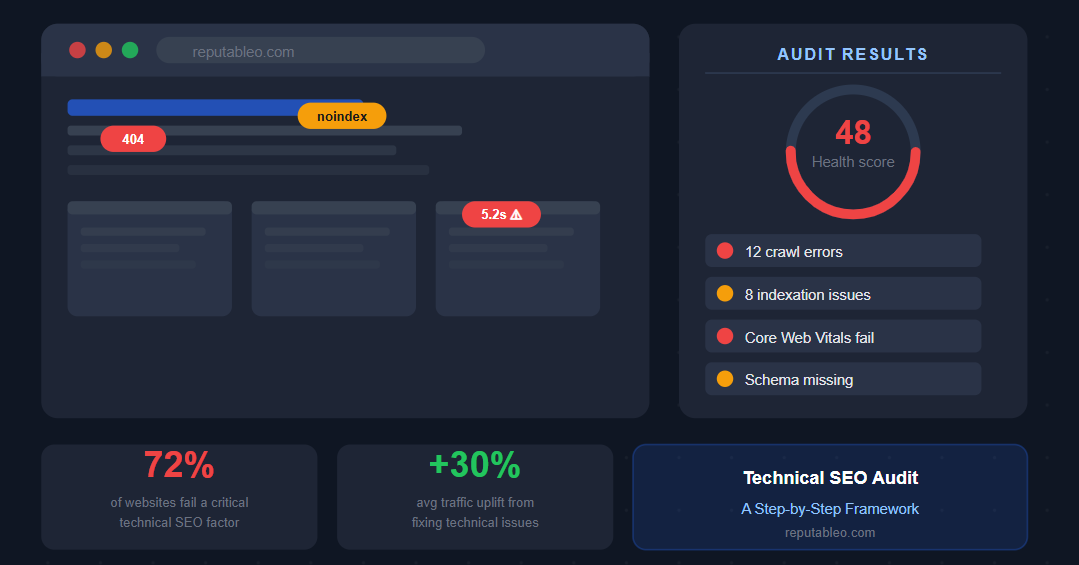
According to Semrush’s 2025 Website Health Benchmark Report, 72% of websites fail at least one critical technical SEO factor. This directly impacts crawlability, indexation, and search visibility.
That’s not a minority problem. It’s almost every website on the internet, including yours.
The good news is that technical SEO issues are fixable, and the return on fixing them is immediate and measurable. Industry data from Ahrefs and Semrush consistently shows that a solid audit delivers a 25 to 40% traffic uplift in four to six weeks. You do not need new content. You do not need more backlinks. You need to find and fix what is already broken.
This guide walks you through a proven step-by-step framework for conducting a full technical SEO audit in 2026, including the areas that most audits miss.
Why Technical SEO Matters More Than Ever in 2026
Search engines have always required websites to be technically sound. But the stakes have risen significantly. Technical quality now affects not just traditional blue-link rankings but also visibility in AI Overviews, Google AI Mode, and generative engine results.
Google’s March 2025 core update elevated Core Web Vitals from a tiebreaker signal to a primary ranking factor for competitive queries. Sites scoring in the “Needs Improvement” range for Interaction to Next Paint dropped an average of 6.2 positions in SERPs within 60 days.
Google (2025) reports 53% mobile abandonment when loading exceeds 3 seconds, and HubSpot (2026) notes a 103% increase in bounce rate for each additional 2 seconds of load time.
And the indexation landscape has become more volatile. In May 2025, a massive indexing purge saw over 25% of 2 million monitored pages actively removed from Google’s index. It’s the highest level of active removal ever recorded. Sites lost between 15% and 75% of their indexed pages in a single event.
Technical SEO is no longer background maintenance. It is the foundation that determines whether everything else in your digital strategy works.
Step 1: Crawl the Site
Before you can fix anything, you need to see what Google sees. Start with a full site crawl using one of the industry-standard tools: Screaming Frog SEO Spider, Semrush Site Audit, Ahrefs Site Audit, or Sitebulb.
Configure the tool to mimic Googlebot’s user-agent so the results reflect what the search engine actually encounters. Enable JavaScript rendering if your site uses JS-heavy frameworks. Without it, you will miss a significant category of issues.
What you are looking for at this stage:
4xx errors — pages returning not-found responses. Every 404 wastes crawl budget and breaks user journeys. Websites with excessive 404 errors experience a 12% drop in user trust. Fixing broken links can improve crawl rates by 18%.
Redirect chains — multiple hops between URLs that dilute link equity and slow crawl speed. Every redirect in a chain should be collapsed to point directly to the final destination.
Duplicate content — URLs serving the same or very similar content that confuse indexation. This is especially common on e-commerce sites with filtered navigation and on sites that have grown through mergers or migrations.
Orphaned pages — content with no internal links pointing to it. Orphaned pages often remain uncrawled or undervalued. Pages published but never linked to are essentially invisible to both users and search engines.
Crawl traps — infinite scroll, faceted navigation, session IDs in URLs, or search result pages that generate endless unique URLs and eat crawl budget without producing rankable content.
Step 2: Audit Indexation in Google Search Console
A crawl tells you what is on your site. Google Search Console tells you what Google has decided to do with it. These two pictures are often very different, and the gap between them is where your biggest traffic losses live.
Open the Page Indexing report in GSC and work through each category:
Indexed pages — confirm these match your expectations. If significantly fewer pages are indexed than you have published, you have an indexation problem.
Excluded by noindex tag — these pages have been deliberately or accidentally told not to appear in results. Check carefully for accidental noindex directives added during development that were never removed.
Crawled — currently not indexed — this is one of the most important categories in 2026. This status means Google knows the URL exists but has actively chosen not to crawl it yet. This is often a crawl budget issue — Google has decided the page is not worth the resource allocation.
Duplicate — Google chose a different canonical than the user — this tells you Google has overridden your canonical tag preference. It almost always indicates an inconsistency in your canonical signals that needs resolving.
Discovered — currently not indexed — Google found the URL but has not yet crawled it. For new content, this is normal. For pages that have existed for months, it signals either crawl budget problems or quality signals that are suppressing crawl priority.
Use the URL Inspection tool to investigate individual pages that are not performing as expected. It shows you the last crawl date, the canonical Google recognised, mobile usability status, and whether the page is eligible for rich results.
Step 3 — Evaluate Core Web Vitals
Core Web Vitals — Largest Contentful Paint (LCP), Interaction to Next Paint (INP), and Cumulative Layout Shift (CLS) — are confirmed Google ranking factors. They measure the real-world experience of loading, interactivity, and visual stability.
Use PageSpeed Insights, the Search Console Core Web Vitals report, or Lighthouse to assess your scores. Google evaluates these at the 75th percentile of page loads. This means your typical user experience matters more than your best-case scenario.
Target thresholds:
- LCP: under 2.5 seconds
- INP: under 200ms
- CLS: under 0.1
Websites that meet Google’s Core Web Vitals standards see a 24% increase in user engagement. A one-second delay in mobile load time can result in a 20% drop in conversion rates.
The most common LCP killers are unoptimised images, render-blocking JavaScript, slow server response times, and a lack of browser caching. Start by compressing all images and converting them to WebP format. This single change resolves LCP failures on a large percentage of websites.
Sites that had not audited their technical health in 12 months saw crawl coverage drop by an average of 34%. Core Web Vitals are a primary driver of the reduction in crawl coverage, and Google deprioritises slow, unstable pages.
Step 4 — Review On-Page Technical Elements
Once you address crawl health and indexation, work through the on-page technical layer. For every key page on the site, audit:
Title tags — unique, under 60 characters, containing the primary keyword. Duplicate title tags are one of the most common technical issues on large sites. Luckily, they’re one of the easiest to fix.
Meta descriptions — unique, under 155 characters. While not a direct ranking factor, meta descriptions influence click-through rate, which affects ranking signals. Missing or duplicated meta descriptions leave this lever untouched.
H1 tags — one per page, clearly aligned with the title tag and the searcher’s intent. Multiple H1s on a single page confuse both users and search engines about the page’s primary topic.
Canonical tags — pointing to the correct preferred URL. Self-referencing canonical tags on all pages is best practice. Canonical loops, where Page A canonicals to Page B and Page B canonicals back to Page A, cause Google to give up on both pages.
Structured data/schema — present, valid, and relevant to the entity type of the page. Missing schema means you do not show up in AI Overviews or rich results. After all, schema is now a ranking factor, not a nice-to-have.
Use Google’s Rich Results Test and the Schema Markup Validator to check all schema implementations for errors and warnings before moving on.
Step 5 — Check Mobile Usability
Google uses mobile-first indexing, meaning the mobile version of your site is what gets crawled, rendered, and used for ranking decisions. A desktop-perfect site with a broken mobile experience will rank poorly regardless of its content quality.
Check Google Search Console’s Mobile Usability report for the most common issues:
- Text too small to read without zooming
- Clickable elements are too close together
- Content wider than the screen, requiring horizontal scrolling
- Viewport not configured correctly
- Resources blocked from mobile crawling
60% of global web traffic now originates from mobile devices. That means a mobile usability problem is not a secondary concern; it is a primary ranking liability.
Step 6 — Review Internal Linking Architecture
Internal links distribute authority across your site and signal to search engines which pages are most important. A strong internal linking structure ensures your highest-value pages receive the most link equity. A weak one means pages that should rank cannot accumulate the authority they need.
Key internal linking audit checks:
Page depth — no important page should be more than three clicks from the homepage. Pages buried deeper receive less crawl priority and accumulate less internal link equity. Review site depth, since pages buried more than three clicks from the homepage receive less crawl priority and link equity.
Anchor text diversity — vary your internal link anchor text naturally. Exact-match anchor text used consistently on internal links can appear manipulative and trigger algorithmic caution.
Orphaned pages — identified in Step 1, these need internal links added from contextually relevant pages. Every published page that matters should receive at least one contextual internal link from a page that is already indexed and receiving organic traffic.
Link equity distribution — confirm your most important pages. These may include service pages, key landing pages, and high-converting content, and they should receive the most internal links.
Step 7 — Audit Structured Data and Schema
Schema markup is no longer optional. In 2026, it is a prerequisite for appearing in AI Overviews, rich results, and knowledge panels. For online reputation management, Person, Organisation, LocalBusiness, and FAQ Page schema are the highest-priority implementations.
Validate every schema implementation using:
- Google’s Rich Results Test — confirms eligibility for rich results
- Schema Markup Validator — checks for structural errors
- Search Console’s Enhancement Reports — shows rich result eligibility and errors at scale
Nearly a third of the US population will use generative AI search in 2026. The minimum viable crawl configuration for AI visibility allows GPTBot, ChatGPT-User, ClaudeBot, PerplexityBot, and Google-Extended. Blocking any of these five means you are invisible on the corresponding platform.
Check your robots.txt to confirm you are not inadvertently blocking AI crawlers, a common and costly oversight.
Step 8 — Manage Crawl Budget
Crawl budget matters most for large sites but affects every site when wasted on low-value content. Every 404 error, redirect chain, and thin duplicate page that Googlebot encounters consumes budget that could be spent on your important content.
The fastest crawl budget fixes:
- Block non-SEO URLs in robots.txt. These include login pages, cart pages, session IDs, and internal search results
- Fix redirect chains by pointing all links directly to final destination URLs
- Consolidate or noindex low-quality pages, including thin content, paginated archives, and parameter variations
- Clean your XML sitemap, so it contains only canonical, indexable URLs with accurate lastmod dates
A SaaS company running guest posting campaigns in the tech industry spent eight months building backlinks with zero ranking movement.
I conducted a technical SEO audit that revealed 312 redirect chains, 47 orphaned pages, and wastage of crawl budget on paginated archive pages. After fixing those three issues alone, their guest post landing pages moved from page 4 to page 1 for 18 target keywords within 90 days.
Prioritising Your Technical SEO Audit Findings
A thorough technical SEO audit will surface dozens of issues. Not all are equal. Prioritise by impact using this hierarchy:
- Critical — issues blocking crawling or indexation (robots.txt errors, accidental noindex, canonical loops)
- High — Core Web Vitals failures, mobile usability errors, schema errors on key pages
- Medium — internal linking gaps, redirect chains, duplicate content
- Low — minor tag issues, non-blocking warnings, cosmetic inconsistencies
Fix critical and high-priority issues before touching anything else. A site with perfect meta descriptions but broken crawl access is still invisible.
Most SEO teams run comprehensive audits quarterly, with monthly checks on Core Web Vitals, coverage errors, and crawl stats. Treat this as a recurring process, not a one-time project. Keep in mind that Google rolls out 500 to 600 algorithm updates per year, and site changes continuously introduce new technical issues.
The Bottom Line
Marcus’s consulting firm recovered its organic traffic within three months of the robots.txt fix. The content was always good. The backlinks were always there. The technical foundation just needed to be checked.
A technical SEO audit is not a walk in the park. It does not produce new content or new links. But it is the work that makes everything else count, and it is the work that most of your competitors are skipping.
At Reputableo, technical SEO auditing is built into every reputation management engagement. A site that cannot be found cannot be suppressed, managed, or grown. Visit reputableo.com/contact to start with a free presence audit.
Not sure what Google and AI say about you right now?
I offer a free 8-area presence audit covering your search results, AI platform responses, Google Business Profile, and entity signals.
Get a Free Audit