| Quick Answer ChatGPT and other AI tools regularly present false, outdated, or missing information about professionals. This happens because AI models train on incomplete web data and then generate confident-sounding responses regardless of accuracy. To fix it, you need to correct the underlying data sources that AI models draw from, including your website schema, third-party profiles, and entity signals across the web. This process is called AI hallucination correction, and it typically takes four to eight weeks for corrections to propagate. |
David Kimani had built a respected consulting practice over nine years. His website ranked on page one for his name. His LinkedIn showed 3,200 followers and a full history of client work.
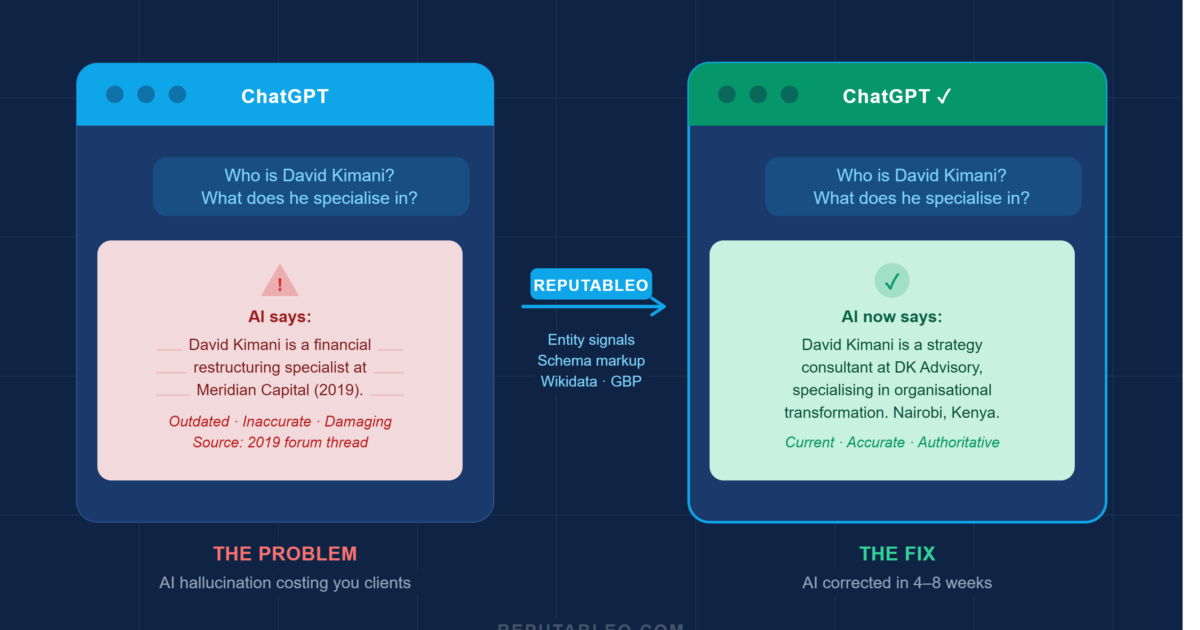
Then a prospective client told him she had almost not reached out. She had asked ChatGPT about him first, and ChatGPT had told her he was no longer practicing. He was, in fact, busier than ever. That single AI response almost cost him the engagement.
This is not an edge case. In 2026, ChatGPT reputation management has become a real operational concern for professionals in high-trust fields. The question is no longer whether AI tools describe you; they do. The question is whether what they say is accurate.
Why AI Tools Get Professionals Wrong
ChatGPT, Perplexity, Google Gemini, and similar tools do not browse the web in real time when they answer questions about a person. Instead, they draw on training data collected up to a specific cutoff date, combined with whatever real-time sources they can access. That means information about you is filtered through several layers before a response is generated.
The first layer is your web presence itself. If your website lacks structured data, your entity signals are weak, and your professional profiles are inconsistent, the AI has little reliable data to draw from. In that gap, it fills in the blanks, sometimes accurately, sometimes not.
The second layer is third-party sources. Wikipedia entries, Wikidata records, LinkedIn profiles, Google Business Profiles, legal directories, and press mentions all feed into how AI systems understand who you are. If those sources contradict each other, the AI reconciles them imperfectly.
The third layer is the model itself. AI tools generate responses probabilistically, meaning they produce the answer that statistically fits the pattern, not necessarily the factually correct one. For well-known public figures with abundant data, this produces reasonably accurate results. For individual professionals with limited online footprints, it produces errors.
| Stat: 45% of consumers used an AI tool to research a professional before making contact in 2026. |
What Bad AI Information Actually Costs You
The damage from inaccurate AI responses is difficult to measure precisely because it happens at the consideration stage. A prospective client encounters incorrect information, loses confidence, and simply does not follow up. There is no rejected proposal, no negative review, no traceable event. The client simply disappears before any contact is made.
In that sense, AI hallucinations about professionals are more damaging than negative Google results. A negative Google result is at least visible. You can see it, monitor it, and respond to it. An AI hallucination operates silently, across multiple platforms, at all hours, and reaches prospective clients at the exact moment they are deciding whether to trust you.
For lawyers, doctors, and financial advisers, where a single new client relationship can be worth tens of thousands of dollars over its lifetime, even a small rate of AI-driven drop-off in consideration represents a significant revenue loss.
The Most Common AI Errors About Professionals
After conducting presence audits for professionals across multiple practice areas, Reputableo consistently sees the same categories of AI error.
The first is an outdated location or practice status. AI tools frequently describe professionals as practicing in a city they left years ago, or as affiliated with a firm they departed. This often happens because old directory listings or outdated press mentions outweigh more recent data in the training set.
The second is incorrect credentials or specialisations. A doctor described as a general practitioner who is, in fact, a specialist. A lawyer listed under the wrong practice area. A consultant attributed with skills from an earlier phase of their career. These errors undermine credibility at the moment it matters most.
The third is complete absence. Some professionals are not described at all by major AI tools. The AI responds with something like ‘I don’t have reliable information about this person.’ For a prospective client already uncertain, that non-answer can be enough to end the evaluation.
How to Fix What ChatGPT Says About You
Correcting AI information about yourself is not a one-step process. It requires identifying the root cause of the error, correcting it at the source level, and then allowing time for AI systems to update their responses. The following steps reflect how Reputableo approaches this in a structured engagement.
Step 1: Audit what the AI currently says
Before making any changes, run systematic checks across ChatGPT, Perplexity, Google Gemini, and Claude. Ask each tool: ‘Who is [your name]?’ and ‘What does [your name] do?’ Document the responses exactly. Note inaccuracies, outdated details, and anything missing. This becomes your baseline.
Step 2: Identify the source of the error
AI tools draw from specific, traceable sources. Check your Google Knowledge Panel, Wikidata record, LinkedIn profile, Google Business Profile, and the top third-party directories that rank for your name. In most cases, the AI error traces back to one or two inconsistent or outdated sources. Community threads feed these answers too, so Reddit reputation management belongs in your correction plan.
Step 3: Implement structured data on your website
Add Person schema markup to your website. This tells Google and AI crawlers exactly who you are, what you do, where you practice, and what credentials you hold. Schema is the most direct signal you can send to the systems that feed AI tools. Without it, the AI is guessing.
Step 4: Correct third-party sources
Update your Wikidata entry, claim and correct your Google Business Profile, and ensure your LinkedIn is current and consistent with your website. Check that your name, title, firm, and location are identical across every profile. Inconsistency is the primary cause of AI error.
Step 5: Build supporting content
Publish authoritative content on your own domain that clearly establishes your current practice area, location, and credentials. AI tools weigh first-party content from the subject’s own domain highly when it is well-structured and entity-rich.
Step 6: Monitor and verify
Re-check the AI tools four to eight weeks after making changes. In some cases, changes propagate within days. In others, particularly where older sources were deeply embedded in training data, corrections take longer. Ongoing monitoring is part of a complete ChatGPT reputation management strategy.
| Case Study: From 2 correct AI responses to 8. A professional services client came to Reputableo after discovering that three major AI tools described them inaccurately. After a structured correction engagement covering schema implementation, Wikidata editing, GBP optimisation, and entity signal building, AI responses across the five platforms tested moved from 2 out of 10 accurate to 8 out of 10 accurate within six weeks. The hallucinations that remained were on platforms with less frequent training update cycles. |
Frequently Asked Questions
How do I check what ChatGPT says about me?
Open ChatGPT and type your full name as a question: ‘Who is [your name]?’ and ‘What does [your name] specialise in?’ Run the same check on Perplexity, Google Gemini, and Claude. Take screenshots of every response before making any changes, so you have a documented baseline.
Can I contact ChatGPT to correct wrong information?
OpenAI has a process for submitting corrections, though it does not guarantee immediate changes. More reliably, you correct the underlying sources that ChatGPT draws from. These include your website schema, Wikidata record, and key third-party profiles. When those sources are accurate and consistent, AI responses update naturally over time.
How long does it take to fix AI hallucinations about a professional?
For most professionals, visible improvements appear within four to eight weeks of making source-level corrections. Platforms with more frequent training update cycles, such as Perplexity, often update faster. Platforms that rely on older training data take longer.
Does this only affect ChatGPT or other AI tools, too?
The same underlying data problems affect ChatGPT, Perplexity, Google Gemini, Claude, and any other AI tool that generates responses about people. The correction strategy is the same across all platforms, because all of them draw from the same ecosystem of web data and structured entity signals.
Do I need a professional to fix AI hallucinations, or can I do it myself?
Some corrections, such as updating your LinkedIn or Google Business Profile, can be done without specialist help. Schema implementation, Wikidata editing, and entity signal building require technical knowledge to do correctly. Errors in schema or Wikidata can make the problem worse rather than better, so professional implementation is recommended for those elements.
| Not sure what ChatGPT and AI tools currently say about you? Reputableo offers a free 8-area online presence audit covering your AI responses, search results, entity signals, and third-party profiles. You will know exactly where you stand and exactly what needs to be corrected. reputableo.com/contact · elisha@reputableo.com |
Not sure what Google and AI say about you right now?
I offer a free 8-area presence audit covering your search results, AI platform responses, Google Business Profile, and entity signals.
Get a Free Audit