| Quick Answer To check what ChatGPT and Perplexity say about you right now, open each platform in a private browser window, type your full name in quotation marks, and run five specific prompts covering your identity, specialty, location, employer, and professional reputation. Screenshot every response before making any changes. This becomes your baseline. Most professionals who do this for the first time find at least one significant inaccuracy. This guide gives you the exact prompts, tells you what to look for in each response, explains why ChatGPT and Perplexity behave differently, and tells you what to do when you find something wrong. |
I want you to stop whatever you are doing right now and try something. Open a new incognito tab. Go to ChatGPT. Type your full name and hit enter.
I have run this exercise with dozens of professionals across Houston, Nairobi, Dubai, and London. The reactions are almost always the same. A pause. A frown. Then something along the lines of, ” That is not right. That is not right at all!”
A financial adviser in Atlanta told me she had been described as semi-retired for two years before she found out. An advocate in Nairobi discovered ChatGPT had him practicing family law when he had switched to commercial litigation three years earlier.
A cardiologist in Dubai found her name attached to a general practice clinic she had never worked at. None of them had checked before I asked them to. They didn’t even think it was a problem worth looking into.
That is the part that gets me every time. Not that the information is wrong. It is that most professionals have genuinely never thought to look.
Why ChatGPT and Perplexity Behave Completely Differently
Before you run the checks, it helps to understand that ChatGPT and Perplexity are not doing the same thing when you ask them about a person. They pull information from different places in different ways, which means you can get two completely different answers about yourself from two platforms that both seem authoritative.
ChatGPT draws primarily from its training data, which has a cutoff date, and then supplements with real-time web search when it needs current information. It weighs Wikipedia and established publications heavily. If your most prominent third-party mention is a 2019 directory listing, that is probably what ChatGPT is anchoring on.
Perplexity, on the other hand, crawls the web in real time whenever you ask a question. It always shows its sources, citing an average of five or more sources per response.
That means Perplexity is more current. However, it’s more susceptible to picking up whatever happens to be ranking for your name right now, whether that is your practice website or a seven-year-old conference listing.
Only about 20% of ChatGPT mentions include clickable citation links that show up in standard analytics. The other 80% of recommendations, descriptions, and comparisons that shape whether a prospective client calls you are completely invisible to traditional tracking tools.
That means you need to check both. A clean ChatGPT response does not mean Perplexity is clean. A problem on Perplexity does not necessarily mean ChatGPT has the same problem.
They are two separate surfaces with two separate source hierarchies, and they both influence whether a prospective client in New York or London or Houston feels confident enough to make contact.
The Exact 5 Prompts to Run Right Now
Open each platform in a private or incognito browser window. This matters because a signed-in session can personalize responses in ways that obscure what a cold prospective client actually sees. Run all five prompts on ChatGPT first, screenshot every response, then repeat the entire sequence on Perplexity, and finally on Google AI Mode. Document everything before making any changes.
Prompt 1: The Identity Check
Type this word for word into ChatGPT, then Perplexity, then Google AI Mode:
"Who is [your full name]?""What does [your full name] do professionally?"
This is the baseline. It tells you what the AI considers your primary professional identity.
Look for three things:
- Is your current specialty described correctly?
- Is your current employer or practice listed accurately?
- Is the description current rather than anchored on something from years ago?
Suppose you are a cardiologist and the AI describes you as a general physician; this is where you will see it first.
Prompt 2: The Location Check
Type this next:
"Where does [your full name] practice?""What city is [your full name] based in?"
Location errors are more common than most professionals expect, particularly for anyone who has moved cities or opened a new office in the last three years. The AI might have your old city, your old building, or an address from a directory listing you have not updated since 2021.
For a lawyer in Houston or a doctor in Dubai who relies on local referrals, a location error is not a minor inconvenience. It makes you invisible to every prospective client searching for a specialist in your area.
Prompt 3: The Specialty and Credentials Check
Type this next:
"What does [your full name] specialize in?""What are [your full name]'s qualifications and credentials?"
This is the prompt that catches the most damaging errors. AI tools frequently confuse sub-specialties, list credentials from an earlier career stage, or omit post-graduate qualifications entirely.
ChatGPT may still describe a financial adviser who became a certified financial planner in 2022 as a general investment adviser because the certification has not yet made it into the sources the AI trusts. A doctor with a fellowship that significantly affects the care they can offer may not have that fellowship mentioned at all.
Prompt 4: The Reputation Check
Type this next:
"What do people say about [your full name]?""What is [your full name]'s professional reputation?""Has [your full name] faced any complaints or disciplinary actions?"
This may feel uncomfortable to run. Run it anyway.
If there is a forum complaint, a bar association mention, a Yelp review, or any other negative content that AI tools are reading, this prompt surfaces it.
You need to know what a prospective client finds when they ask this question about you before they call. If the answer surprises you, that is exactly the kind of information this process is designed to uncover.
That said, do not panic at an unfamiliar result. Note it, screenshot it, and check where the AI is sourcing it from before deciding how to respond. In most cases, a result like this traces back to a specific page that can be either addressed directly or suppressed over time.
Prompt 5: The Comparison Check
Type this last:
"Who are the top [your specialty] professionals in [your city]?""Can you recommend a [your specialty] in [your city]?"
This is the prompt your prospective clients are actually typing. They are not searching specifically for you by name. They are searching for the best specialist in their area and then deciding who to call.
If your name appears in the response, note your position in the list and how you are described. If your name does not appear, that is the most important finding of the entire exercise. It means you exist in AI systems as a person but not as a recommended authority, which is a generative engine optimization problem that entity signals and structured content can fix over time.
89% of B2B buyers now consult generative AI during their purchasing journey.
Source: Forrester Research, B2B Buyer Behavior Report, 2025 (forrester.com)
What to Do With What You Find
Once you have run all five prompts across ChatGPT, Perplexity, and Google AI Mode, you will have a clear picture of your AI presence across three surfaces. Most professionals fall into one of four categories.
- Accurate description, current location, correct specialty. Strong entity signal foundation. Monitor monthly but no urgent action required.
- Outdated employer, old city, or stale specialty description. An AI hallucination is in progress. Correct your Wikidata record, LinkedIn, and directory profiles. See this article for the full correction process.
- Absent or minimal information — AI says it lacks reliable data about you. Thin presence problem. You need entity signal building: Person schema, a Wikidata entry, and FAQ-structured bio content on your own domain.
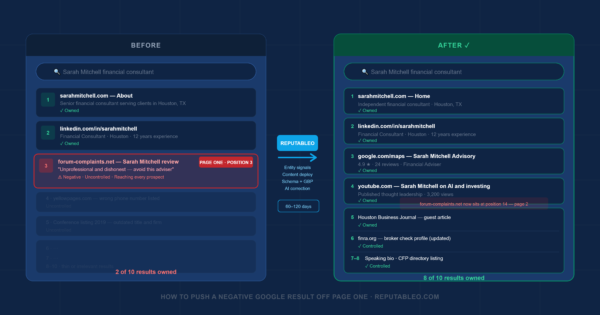
- Negative content surfaced in Prompt 4. Identify the source first. If it is a low-authority page, suppression is usually achievable in 30 to 90 days. If it is a high-authority publication, a longer campaign is required. See this article about How to Push a Negative Google Result Off Page One for the full suppression process.
How Often Should You Check
Here is the honest answer: once a month is the minimum for any professional whose business depends on referrals or online discovery.
AI responses are not static. They shift as training data updates, as new content gets indexed, and as AI models themselves get updated. A correction you made in April can drift back toward an error by July if the underlying signal sources are not strong enough to hold it.
The easiest way to make this a habit rather than a chore is to tie it to something you already do every month. The first of the month, when you review your business finances. The last Friday before a long weekend. Whenever you check your Google Business Profile reviews.
Pick a trigger and attach the AI check to it. The whole process, across all five prompts on all three platforms, takes about fifteen minutes once you know the rhythm.
For professionals in markets where AI adoption is growing fastest, such as Nairobi, where Kenya ranks first globally for ChatGPT adoption, and Dubai, where the UAE ranks second, monthly checking is not optional. It is the minimum viable monitoring cadence for a professional whose name and reputation are their primary business asset.
One Thing Most Professionals Miss During the Check
When you run Prompt 5, the comparison check, make sure you try at least three different phrasings of your specialty.
AI tools respond differently to “personal injury attorney” versus “injury lawyer” versus “accident attorney.”
A doctor might be recommended when someone asks for a “cardiologist in Dubai” but not when they ask for a “heart specialist in Dubai.” Try both the clinical term and the plain-language version. Try your city name and the neighborhood or district you actually practice in.
The variation in responses will tell you exactly which query strings your entity signals are strong enough to influence and which ones still need work. That specificity is what separates a professional who is managing their AI presence from one who is just monitoring it.
Frequently Asked Questions
How do I check what ChatGPT says about me without a paid account?
You can run all five prompts on ChatGPT‘s free tier at chat.openai.com. No subscription required. Open it in a private or incognito browser window so the responses are not personalized by your account history. The free tier uses a slightly older model than the paid versions, but for a name-based reputation check, the results are reliable enough to give you an accurate baseline. Perplexity is also free at perplexity.ai with no sign-in required. Google AI Mode requires a Google account but is accessible without a paid subscription.
What if ChatGPT says it does not have information about me?
That is actually one of the most useful findings you can get from this exercise. It means your entity signals are too thin for the AI to confidently describe you. The fix is structured: add Person schema to your website, create or update your Wikidata entry, ensure your professional directory profiles are complete and consistent, and publish FAQ-structured content on your own domain. These signals give AI systems enough to work with. Most professionals see improvements within four to eight weeks of making these corrections.
Is the check different for a business versus a personal name?
Yes, meaningfully so. For a personal name check, you are looking at how the AI describes you as an individual: your specialty, credentials, location, and reputation. For a business name check, you are looking at how the AI describes the firm: its practice areas, its reputation, whether it recommends the firm for specific types of matters, and whether it surfaces any negative content associated with the firm name. Run both checks separately. A clean personal name result does not guarantee a clean business name result, particularly for small firms where the personal and business reputations are closely linked.
ChatGPT and Perplexity said different things about me. Which one is right?
Neither is necessarily right, but the differences are informative. ChatGPT is drawing from its training data and established sources. Perplexity is drawing from what is currently ranking for your name on the web. If the descriptions differ, there is a gap between your historical data footprint and your current web presence. Correcting your directory profiles and adding current schema markup typically brings both platforms closer to alignment within four to eight weeks, because both will eventually draw from the same corrected source signals.
Can I ask ChatGPT and Perplexity to correct wrong information directly?
You can submit a correction request to OpenAI through their personal data form at openai.com/policies/privacy. It is worth doing, but it is not the primary fix.
The more reliable and faster approach is correcting the underlying sources that AI tools draw from: your Wikidata record, your LinkedIn profile, your Google Business Profile, and your key directory listings. When those sources are accurate and consistent, AI responses update naturally over time.
Think of it like updating your address with the post office versus calling every single person who might send you mail. Fix the source, not each individual instance.
Not sure what ChatGPT and Perplexity are currently saying about you?
Reputableo offers a free 8-area online reputation management audit covering your AI platform responses across AI Mode, ChatGPT, and Perplexity, and your entity signal gaps, your schema status, and your page-one search results. Delivered in 3 business days. No obligation.
reputableo.com/contact · elisha@reputableo.com
Serving professionals in Houston, Atlanta, Nairobi, Dubai, London, and worldwide.
Not sure what Google and AI say about you right now?
I offer a free 8-area presence audit covering your search results, AI platform responses, Google Business Profile, and entity signals.
Get a Free Audit