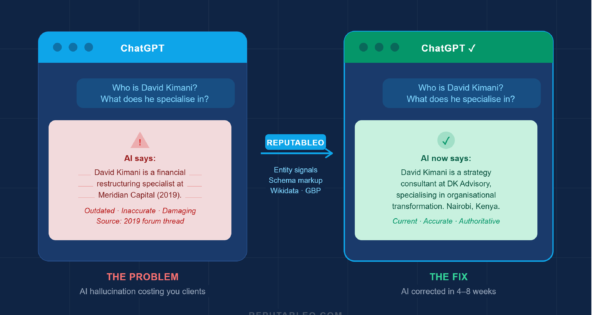
| Quick Answer An AI hallucination happens when ChatGPT, Perplexity, or another AI tool states something about you that is confidently wrong. It might say you practice in a city you left three years ago, list a former employer as your current one, or describe a specialty you never held. These errors are not rare glitches. A 2026 benchmark across 37 AI models found hallucination rates between 15% and 52% depending on the model and task. The fix is not to argue with the AI. It is to correct the underlying data the AI is reading from, specifically your online entity signals. This guide explains what AI hallucination is in plain language, why it happens, and what you can do about it as part of a broader online reputation management strategy. |
I ran a presence audit on a management consultant in Atlanta last spring. Before I showed her the results, I asked her to type her own name into ChatGPT. She had never done it.
What came back described her as a financial restructuring specialist, a field she had left eight years earlier, affiliated with a firm she had departed in 2021. Her current practice, her real specialty, and her actual client focus were nowhere in the response.
She looked at the screen and said, very quietly, that she had lost two clients the month before. Both had said they went in a different direction after doing their research. She had assumed they meant her pricing. She had not assumed they meant ChatGPT.
That moment is what AI hallucination looks like in practice. Not a dramatic, obvious error. A quiet, confident misdescription of who you are, sitting in an AI response window, reaching prospective clients before you ever get the chance to speak.
What AI Hallucination Really Is: A Confident Lie Powered by Bad Data
AI hallucination is simply when an AI tool states something that is not true, and does so with complete confidence.
The reason it happens is not that the AI is broken. It is that AI tools predict what sounds correct based on patterns in the data they were trained on.
When the data about you is thin, outdated, or contradictory, the AI fills the gaps with plausible-sounding information. That information might be technically drawn from something real, like a directory listing from five years ago or a conference bio from 2019. Or it might be a confident confabulation with no reliable source at all.
Think of it this way: if you asked a new colleague to describe your background and they had only read a three-year-old LinkedIn profile and a forum thread that mentioned your name, their description would be incomplete at best and wrong at worst. AI tools face the same limitation, just at a far larger scale and with far greater confidence.
| A 2026 benchmark across 37 AI models found hallucination rates between 15% and 52% depending on the model and task. OpenAI’s o3 reasoning model hallucinated 33% of the time on the PersonQA benchmark, which tests factual recall about real people. |
7 Critical Ways AI Hallucination Misleads Your Market
1. Wrong specialty or practice area
This is the most common hallucination I find when running presence audits for professionals in Houston, Atlanta, and Dubai. A doctor described as a general practitioner when they are a cardiologist. A lawyer described as a family attorney when they specialize in personal injury. A consultant described as a supply chain expert when they focus on organizational strategy. The AI pulled an old directory listing, a conference bio, or a LinkedIn headline from years ago and presented it as the current picture.
The damage is immediate. A prospective client searching for a specialist who finds an AI describing a generalist quietly moves on to the next name. They do not call to verify. They do not click your website. They just stop.
2. Outdated employer or affiliation
AI training data has a cutoff, and it does not always know what happened after that cutoff. Professionals who have changed firms, launched independent practices, or moved from a hospital group to a private clinic are frequently described by AI tools using affiliations that are years out of date.
I have seen this in London-based financial advisers who left major banks to go independent, and in Nairobi-based physicians who moved from public hospital roles to private practice. In both cases, ChatGPT was describing who they used to be, not who they are.
3. Wrong location
Location errors are particularly damaging for professionals who rely on local referrals. An attorney described as practicing in Dallas when they moved their office to Houston three years ago is invisible to every prospective client in Houston searching for local counsel.
A consultant described as based in London when they relocated to Dubai is unreachable to the client base they are actively building. Location data in AI responses feeds from directories, press mentions, and schema data. When that data is stale or inconsistent, the AI gets it wrong.
4. Invented or misattributed quotes and cases
This one is less common but more damaging when it happens. AI tools occasionally generate quotes attributed to a professional that the professional never said, or describe case outcomes, client results, or positions that have no basis in fact.
In legal contexts specifically, this carries serious risk. Several US attorneys received professional sanctions after submitting court filings that cited fictional case law generated by AI. The same dynamic applies when an AI misattributes a quote or a controversial position to a named professional and that misinformation reaches clients, colleagues, or journalists.
5. Incomplete or missing professional profile
Sometimes the hallucination is not wrong information. It is no information. ChatGPT says it does not have reliable data about this person. Perplexity returns a one-line description with no detail.
Google AI Mode skips to a competitor. For a professional in a competitive market, the absence of a confident, accurate AI profile is functionally equivalent to not existing in that search channel. Online reputation management for professionals in 2026 has to include building the data layer that gives AI tools enough to work with.
6. Confusion with another person
Professionals with common names face a specific version of this problem. If there is another consultant, lawyer, or doctor with a similar or identical name, AI tools sometimes blend their profiles, attributing one person’s credentials, location, or history to the other.
I ran a presence audit on a physician in New York who shares a name with a researcher at a different institution. ChatGPT was describing her as an academic researcher with no clinical practice. Her actual clinical practice had been running for eleven years.
7. AI Overviews surfacing outdated content
Google AI Overviews can surface information from web pages that rank well but have not been updated in years. A professional whose most prominent third-party listing is a 2020 directory entry will find that AI Overviews default to that 2020 description when generating a summary for their name.
This is not technically a hallucination in the strictest sense, since the AI is reading from a real source. But the practical effect on reputation is identical: a prospective client gets an inaccurate picture with no reason to question it.
| ECRI ranked AI chatbot misuse as the number-one health technology hazard for 2026, noting that over 40 million people consult AI tools for health information daily. For doctors in Houston, Dubai, and Nairobi, an AI hallucination about specialty or affiliation is not a minor inconvenience. It is a patient safety and revenue risk. Source: ECRI 2026 Top 10 Health Technology Hazards Report (ecri.org) |
The Invisible Risk: Why You Won’t Notice Until Clients Leave
Most professionals never search their own name on AI tools. They check Google occasionally, maybe look at their Yelp or Google Business Profile rating, and assume their website is doing the rest of the work. The AI layer is completely invisible to them until a client mentions something, or until they happen to run the check themselves.
Even when professionals do check, they often check once and assume the result is stable. It is not. AI tool outputs shift as training data updates, as new web content is indexed, and as the models themselves change. A result that was accurate in January can drift by March. A correction made in April can be undone by a model update in June. This is why online reputation management for professionals in 2026 has to include ongoing monitoring of AI platforms, not just a one-time check.
The other reason hallucinations are hard to catch is that they sound authoritative. The AI does not say it is guessing. It presents the wrong information in the same confident tone it uses for correct information. A prospective client reading a ChatGPT response has no reason to doubt it. They simply act on it.
The 6-Step Blueprint to Reclaim Your AI Identity
Correcting an AI hallucination is not a matter of sending a correction form to OpenAI, though that option exists and is worth trying. The real fix is structural. You need to correct the data sources the AI is drawing from, so the AI has better information to work with. Here is the exact process.
Step 1: Run the audit first
Search your full name in ChatGPT, Perplexity, Google AI Mode, and Google Gemini. Ask each one: ‘Who is [your name]?’ and ‘What does [your name] specialize in?’ Screenshot every response before making any changes. This is your baseline. Without it, you will not know whether your corrections are working.
Step 2: Find the source of the error
AI tools draw from traceable sources. Check your Google Knowledge Panel, your Wikidata record, your LinkedIn profile, your Google Business Profile, and the top directory listings that rank for your name. In most cases, the hallucination traces back to one or two sources that are outdated, incomplete, or inconsistent with your current reality. See [Post A3: How to Check What ChatGPT and Perplexity Say About You Right Now] for a step-by-step search process.
Step 3: Add Person schema to your website
Person schema is structured data that tells AI crawlers exactly who you are, what you do, where you work, and what your credentials are. It is the most direct signal you can send to the systems that feed AI tools. Without it, the AI is inferring your identity from whatever it can find across the web.
Schema is not complicated to add. It takes two to four hours to implement correctly and begins influencing AI responses within weeks.
Step 4: Correct every directory profile
Update your LinkedIn, your Wikidata entry, your Google Business Profile, and every professional directory that ranks for your name. Make sure your name, title, specialty, employer, and location are identical across all of them.
Inconsistency across platforms is the primary driver of AI hallucination for individual professionals. When the AI sees three different descriptions of who you are, it has to guess which one is right, and it frequently guesses wrong.
Step 5: Publish accurate, structured content on your own domain
Create a FAQ-structured bio page on your website with clear, factual answers to questions a prospective client might ask ChatGPT about you. Implement FAQPage schema on that page.
Include your current specialty, your location, your credentials, and your practice focus. AI tools weight structured, entity-rich content from a professional’s own domain highly when it is well-organized and clearly attributed. This is the single most effective long-term fix for recurring hallucinations.
Step 6: Monitor monthly and recheck after model updates
Re-check all four AI platforms four to six weeks after making your corrections. Some platforms update quickly. Others take longer, particularly if older content is deeply embedded in their training data.
Set a monthly reminder to run the same name search. When OpenAI, Google, or Perplexity release a major model update, run the check again that week, because updates sometimes reset corrections that had previously taken effect.
| Case Study: Management Consultant (Atlanta, Georgia) Following the audit described in the opening of this article, the consultant’s engagement covered Person schema implementation, a Wikidata entry correction, LinkedIn headline rewrite, and a FAQ-structured bio page. AI responses across ChatGPT, Perplexity, and Google AI Mode were corrected to accurate, current descriptions within six weeks. In month two, she received three inbound client inquiries and attributed two of them directly to referrals from professionals who had researched her online before making contact. |
Frequently Asked Questions
What is AI hallucination in simple terms?
An AI hallucination is when an AI tool like ChatGPT or Perplexity states something that is wrong, and does so confidently, without flagging any uncertainty. The AI is not lying intentionally. It is making its best prediction based on the data it has access to.
When that data is outdated, inconsistent, or missing, the prediction goes wrong. For professionals, this most often shows up as the wrong specialty, outdated employer, or wrong location appearing in an AI response about them.
How do I know if ChatGPT is saying something wrong about me?
The only way to know for certain is to check it yourself. Open ChatGPT and type your full name as a question: ‘Who is [your name]?’ and ‘What does [your name] do?’ Run the same check on Perplexity, Google AI Mode, and Google Gemini.
Screenshot every response. Compare what each platform says against your current, accurate professional profile. If anything is wrong, outdated, or missing, you have a hallucination to correct.
Can I contact ChatGPT to remove wrong information about me?
OpenAI has a personal data request form that allows individuals to submit correction requests. It is worth submitting, but it is not the primary fix. The more reliable approach is correcting the underlying data sources that ChatGPT draws from, specifically your website schema, your Wikidata record, and your key directory profiles. When those sources are accurate and consistent, AI tool responses update over time. The structural correction is faster and more durable than waiting for a manual review.
How long does it take to fix an AI hallucination?
For most professionals, visible improvements appear within four to eight weeks of making source-level corrections. Platforms that update more frequently, like Perplexity, often correct faster. Platforms that rely on older training data take longer. The key is making all corrections simultaneously rather than one at a time, and then re-checking on a scheduled basis rather than assuming the fix is permanent.
Is AI hallucination a real business problem or just a technical curiosity?
It is a real business problem with measurable consequences. A 2026 UC San Diego study found that AI-generated summaries with hallucinations influenced purchase decisions 60% of the time.
For a consultant in London or an attorney in Houston whose prospective clients are researching them on AI tools before making contact, an inaccurate AI response is not a curiosity. It is a client acquisition barrier that operates silently and compounds over time. The professionals who address it proactively are building a genuine advantage over those who do not.
| Not sure what AI tools are currently saying about you? Get your free audit today! Reputableo offers a free 8-area presence audit that covers your AI platform responses across ChatGPT, Perplexity, and Google AI Mode, your entity signals, your schema gaps, and your page-one search results. You will know exactly where the hallucinations are and exactly what to fix first. Fill out the contact form or email elisha@reputableo.com today for your free audit! Serving professionals in Houston, Atlanta, Nairobi, Dubai, London, and worldwide. Delivered in 3 business days. No obligation. |
Not sure what Google and AI say about you right now?
I offer a free 8-area presence audit covering your search results, AI platform responses, Google Business Profile, and entity signals.
Get a Free Audit